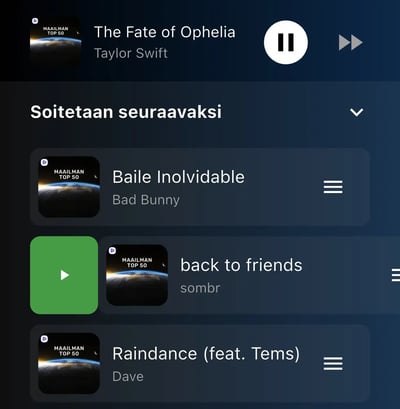
By default, the Feelment app allows multiple playlists to be played at the same time. In practice, this means:
-
If you start playing a new playlist while another one is already playing, Feelment will play tracks from both playlists.
-
If shuffle is enabled, tracks will be played randomly from all active playlists.
When Should You Use This?
This feature is useful when you want to combine music from multiple playlists. However, if you prefer to play only one playlist at a time (for example, during fitness classes), you should turn this setting off. Note: This setting can only be turned off on iOS and Android devices. Currently, the Windows version of the Feelment app does not support this mode.
Tip: If you are leading fitness classes, we recommend disabling both this setting and shuffle mode. This helps keep your music clear and easy to control during your session.
How to Turn Off Playing Multiple Playlists Simultaneously
iOS (Apple) and Android devices
-
Open Settings in the Feelment app by tapping the gear icon ⚙️
-
Find: “Play multiple playlists simultaneously”
-
Toggle the setting off. When the toggle is grey, the feature is disabled.
Windows devices
The Windows version of the Feelment app currently does not support disabling this setting.
What Happens When the Feature Is Turned Off?
-
Feelment will play only one playlist at a time.
-
When you start a new playlist, it replaces the currently playing one.
Additional controls
-
You can start a single track directly from a playlist by pressing the play button next to the track (see image below).
-
After a track finishes, the next track from the same playlist will play automatically. If shuffle is enabled, Feelment will randomly select the next track. You can turn shuffle off in the app settings.
-

-
You can move a track to play immediately by swiping it to the right in the queue (see image below).